Copy this license key. Paste it into the app. That is the flow a lot of desktop products still ship, and every step of it is a place to lose a user. The key is 40 characters of base64 that does not survive a double-click select. It arrives by email that lands in spam. It gets pasted with a trailing space. And when it goes wrong, it goes wrong in a support ticket, not in a place you can instrument.
Meanwhile the user is already logged into your website in the same browser, holding a perfectly valid session token. The license key is re-solving a problem the browser already solved. So don't. Let the browser sign the desktop app in directly. This is the pattern behind "Open in VS Code," GitHub CLI's gh auth login, and the Spotify desktop app, and it is less code than the license key flow it replaces.
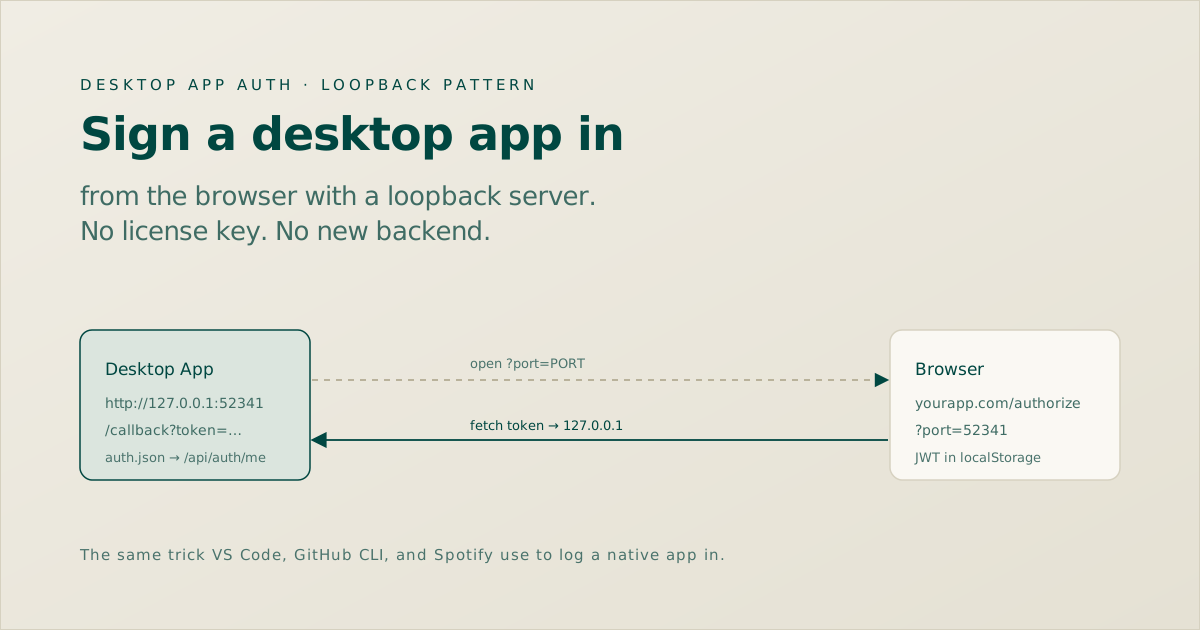
127.0.0.1, opens the browser to an /authorize page, and the page fetch()es the token straight back to that local server. The token never touches an email, a clipboard, or a new backend route.
1. The flow, end to end
Six steps, and only two of them are new code. The desktop app owns the loopback server; the website owns one new page. The backend does nothing it wasn't already doing.
Notice what is missing: no polling, no device-code screen, no "enter this number" step. The loopback server means the token comes back to the app the instant the user clicks authorize, over a channel nobody else on the network can reach.
2. The desktop side: a loopback server
In Electron's main.js, the app binds an HTTP server to 127.0.0.1:0 and lets the OS pick a free port. When the browser hits /callback, it pulls the token off the query string, validates it, and saves it.
function startBrowserAuthLoopback() {
  const server = http.createServer((req, res) => {
    const url = new URL(req.url, 'http://127.0.0.1')
    const token = url.searchParams.get('token')
    const refreshToken = url.searchParams.get('refreshToken') || ''

    // Chrome Private Network Access needs this header
    res.setHeader('Access-Control-Allow-Private-Network', 'true')

    if (token) {
      handleSuccessfulAuthToken(token, refreshToken)
      res.end('<h2>Connected! You can close this tab.</h2>')
    } else {
      res.statusCode = 400; res.end('missing token')
    }
  })

  server.listen(0, '127.0.0.1', () => {
    const { port } = server.address()
    shell.openExternal(
      `https://yourapp.com/authorize?port=${port}`
    )
  })
}
handleSuccessfulAuthToken is the other half: call GET /api/auth/me with the token as a Bearer header, and if it comes back 200, write { accessToken, refreshToken, user } to auth.json in the userData directory. On next launch, read that file, re-validate against the same endpoint, and skip the login window entirely. Expired tokens get caught on that startup check, not at some random later API call.
auth.json is a claim, not a guarantee. One round trip to /api/auth/me turns "I have a saved token" into "I have a token the server accepts right now." It is the cheapest possible way to catch a revoked or expired session before the user sees a broken UI.
3. The website side: one /authorize page
The page reads the port off the URL, grabs the token the browser is already sitting on, and does two things: it fetch()es the loopback server, and it fires a deep link as a fallback. Whichever lands first wins.
const port = searchParams.get('port')

async function handleAuthorize() {
  const token = localStorage.getItem('token')
             || localStorage.getItem('accessToken')
  const refreshToken = localStorage.getItem('refreshToken') || ''

  // Primary: hit the loopback server
  await fetch(
    `http://127.0.0.1:${port}/callback?token=${token}&refreshToken=${refreshToken}`,
    { method: 'GET', mode: 'no-cors' }
  ).catch(() => {})

  // Fallback: deep link, in case the fetch is blocked
  window.location.href =
    `myapp://auth/callback?token=${token}&refreshToken=${refreshToken}`

  setStatus('success')
}
If the user isn't logged in when they land here, redirect to /login?port=… and auto-run the authorize step once they're back. The port survives the round trip through the query string, so the login page just forwards it.
4. Why two delivery paths
The loopback fetch is the fast, silent path. The myapp:// deep link is insurance. Belt and suspenders, because each one fails in a different environment.
| Path | Wins when | Fails when |
|---|---|---|
| Loopback fetch | App is running and its port is open | Browser blocks HTTPS → localhost (Chrome PNA) |
| Deep link | URL scheme is registered in the OS | App isn't running, or scheme isn't installed |
Fire both. The loopback path handles the common case in milliseconds; the deep link covers the browser that decided your localhost fetch looks suspicious.
5. The one gotcha that will bite you
Chrome's Private Network Access policy can block a request from https://yourapp.com to http://127.0.0.1 as a possible CSRF-into-your-LAN attack. The fix is one header on the loopback server's response:
res.setHeader('Access-Control-Allow-Private-Network', 'true')That is it. Without it the fetch silently fails and you spend an afternoon convinced your token parsing is broken. With it, the browser is satisfied that the local server opted in.
6. Is passing a token in a URL safe?
It reads scary and it is fine here, for the same reasons it is fine in VS Code and GitHub CLI. The server binds to 127.0.0.1, not 0.0.0.0, so nothing off the machine can reach it. The token travels over the loopback interface, which never hits the wire. And it is validated server-side on arrival via /api/auth/me, so a stale or forged value is dead on delivery. The deep-link scheme does need to be registered in the app's build config, which is the one piece of platform plumbing to not forget.
7. What this costs to build
The reason to like this pattern is the ledger. The backend is untouched, so the whole thing is desktop plus one frontend page. Roughly: loopback server and token handler in main.js, load-and-validate on startup, register the URL scheme, the /authorize page, auto-authorize on login, and the license-key teardown. Half a day, most of it QA.
The thing that makes it cheap is refusing to build a backend for it. The token exists. The validation endpoint exists. The session in the browser exists. All the missing piece ever was is a courier: something to carry the token the four inches from the browser to the app running next to it. A loopback server is that courier, and it is fifteen lines.